Voice capture
Say the task.
Check the draft.
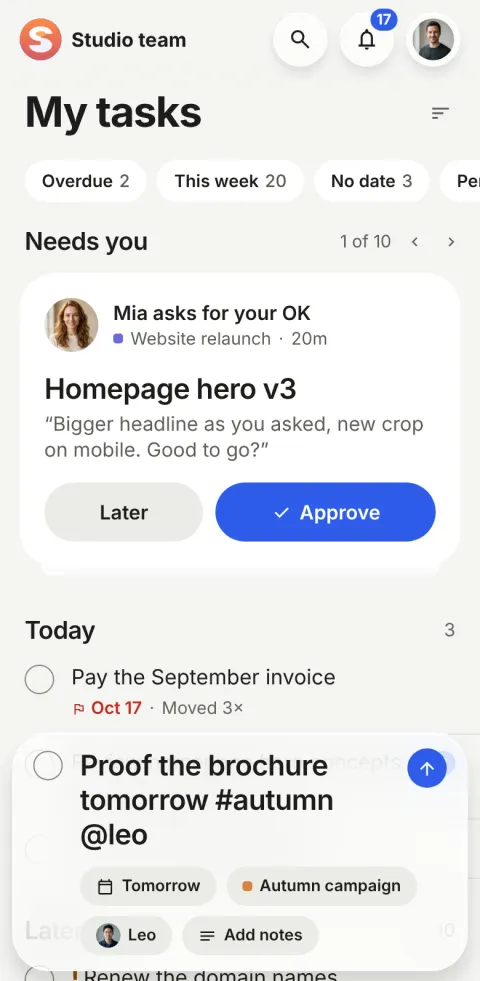
Hold + and say what needs doing. A draft opens in quick add, and nothing is created until you tap Add.
What is voice capture?
Voice capture is the one AI feature in Pinok. Hold + and speak: your phone turns your voice into words, and Claude, an AI model by Anthropic, drafts the task from them. You check the draft and tap Add.
How does voice capture work?
-
Hold +
On iPhone or Android, hold + and say the task the way you’d tell a teammate.
-
Claude drafts it
A short title, notes, a date, project, owner and priority, and subtasks with their own people and dates.
-
Check it, tap Add
Change anything in quick add. Nothing is created before you tap Add.
The details
-
No audio reaches us
Your phone’s own speech recognition turns your voice into words. Pinok never receives or keeps the audio.
-
Only the words go to Claude
With your workspace’s people and project names, so it picks the right ones. Nothing is kept after the draft.
-
Offline, it still works
The words become the task at once and are filled in later. Say nothing, and no task is made.
Questions about voice capture
Does Pinok use AI?
Only for voice capture. Your phone turns speech into words; the words, with your workspace’s people and project names, go to Claude (an AI model by Anthropic) on Pinok’s server, which drafts the task. You check the draft before adding it. Everything else in Pinok is plain rules.
What is sent, and is it kept?
The recognised words, today’s date, and the names and ids of your workspace’s people and projects. No audio. Pinok stores nothing from it except the task you add. We don’t use your content to train AI models.
What if I’m offline?
The words become the task at once, and the draft fills it in when you’re back online.
Everything moving. Everyone in sync.
Team tasks don’t have to be another job.
Pin the next step, leave the follow-ups to Pinok, and get back to the work that matters.
Free for small teams · iPhone, Android & web
Get Pinok